Scattered records
Employees needed a clear relationship to their client and work site, so teams could find the right person and act on the right record.


HRMS / Case study 01
Connecting employee onboarding, bank verification, and salary workflows in an in-house operations tool.
Mapped the operational workflows, defined paths for updating incomplete records, and designed the payroll and onboarding interfaces.
01 / OVERVIEW
A manpower business needed an in-house way to manage employees across multiple client sites. Records were fragmented, and salaries could reach the wrong bank account or be paid twice.
The immediate brief was practical: organize employee records, support supervisor-led onboarding, generate salary slips, and make payment status clear. The founder wanted control over the system and its data, with an approach that could grow beyond the urgent payroll problem.
How can we make employee and salary data dependable, without making everyday payroll work harder?
02 / CONTEXT
The design had to connect three groups: the internal HR team managing records, supervisors onboarding employees at sites, and employees accessing their documents.
Employees needed a clear relationship to their client and work site, so teams could find the right person and act on the right record.
Re-uploading an employee sheet triggered bank verification again, including for employees who had already been verified.
Employees could be onboarded without the salary information required to generate complete offer letters.
03 / DESIGN DECISIONS
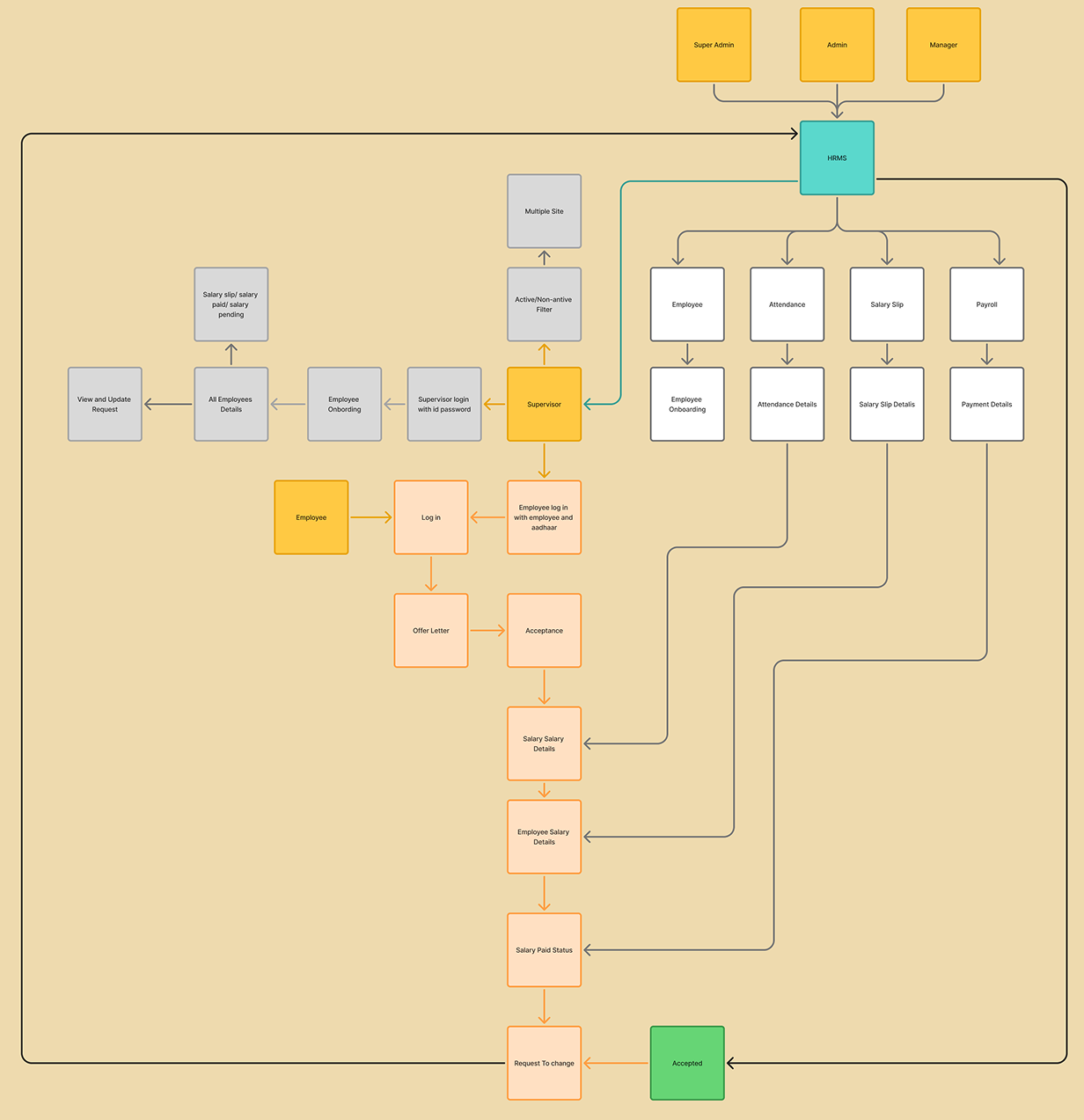
The flow starts with a client and its sites, then assigns employees to a site. A unique employee ID connects records through onboarding, attendance, salary data, and payroll.
Why this matters: the same employee should remain identifiable across uploads and different operational tasks.
Separate data checks from bank verification. Check required fields, duplicate employee codes, and bank-detail formats before sending eligible records for verification. Already verified, unchanged records should not create another unnecessary paid check.
Trade-off: reducing API calls must never hide a change that requires fresh verification.
Illustrative scenario: 500 existing employees with unchanged, verified details and 100 new employees. This explains the workflow logic; it is not a measured production result.
An Update Details option lets authorized HR staff add or correct missing salary and employee information after onboarding. Validation and an audit trail support corrections without forcing the team to onboard everyone again.
Trade-off: flexible editing needs clear permissions and traceability when information is sensitive.
Distinguish pending and paid employees and connect payment tracking to UTR details. Support bulk salary-slip export and a salary-processing sheet for the bank transfer workflow.
Why this matters: preparing a payroll file and confirming payment are different steps. The interface needs to make that distinction clear.
04 / INTERACTION FLOW
Give every uploaded employee a clear operational context.
Validate fields and identify records that need correction.
Run the required bank checks after basic data is valid.
Add valid employees and surface actionable errors for the rest.
Attendance, wage data, salary slips, and payment tracking build on this employee record. Supervisors see the sites assigned to them; employees can access their salary slips and offer letters.
05 / INTERACTION DETAILS
Bulk workflows need more than a successful upload. These interaction requirements make the recovery path explicit and provide a clear basis for implementation review.
| Situation | Interface response | Why it matters |
|---|---|---|
| Missing or invalid fields | Identify the affected row and field; explain what needs correcting. | Turn a failed upload into an actionable task. |
| Previously verified record | Distinguish an unchanged verified record from one that needs a fresh check. | Avoid unnecessary verification without overlooking changed details. |
| Incomplete salary data | Provide a clear Update Details path before generating the document. | Recover through an existing record instead of starting again. |
| Payment awaiting confirmation | Keep preparation, pending payment, and confirmed payment distinguishable. | Help teams understand what has happened and what still needs action. |
Implementation review: confirm the permission rules, failure messages, audit details, and behavior after a partial upload with engineering.
06 / THE INTERFACE
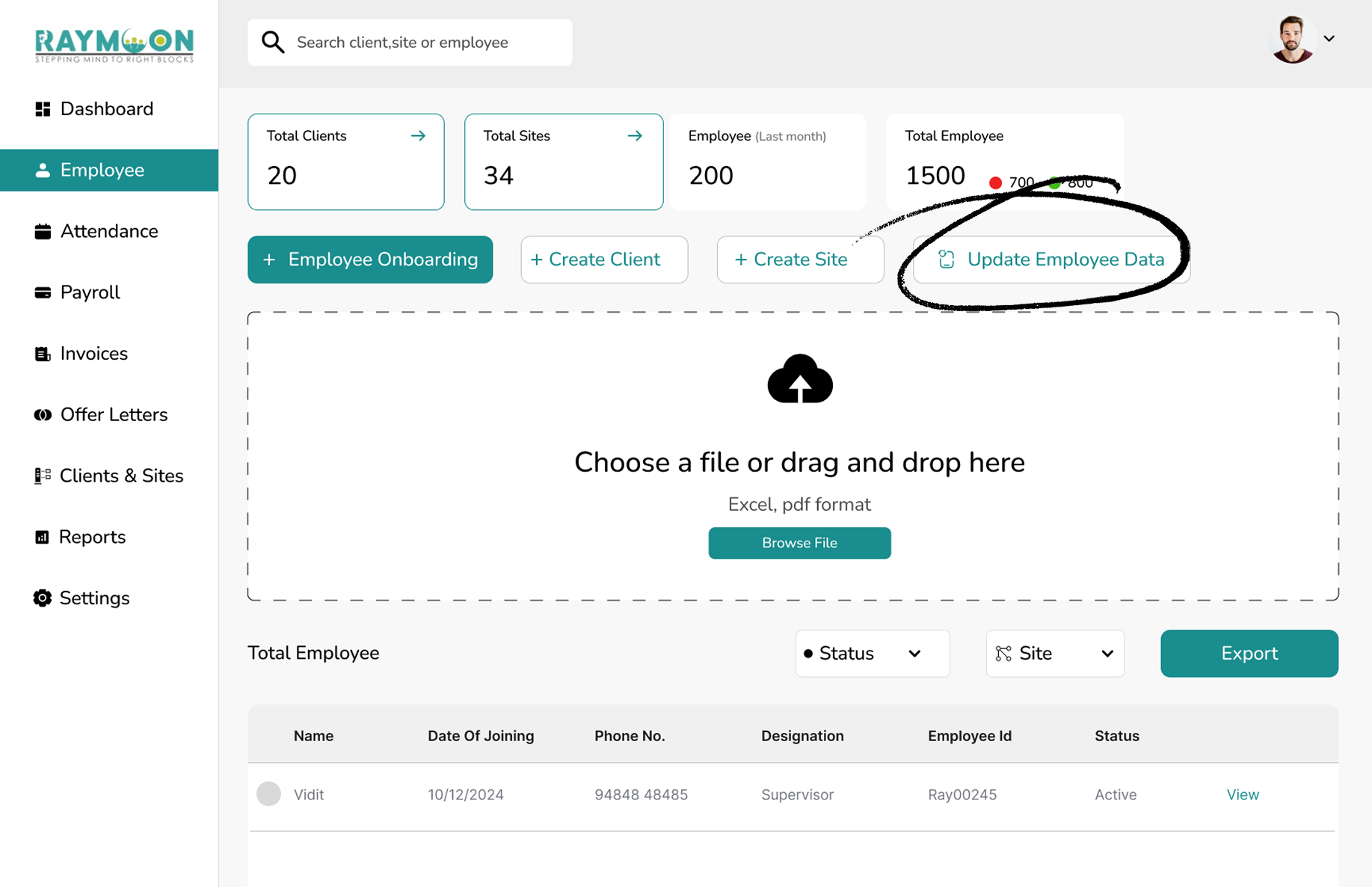
The onboarding surface brings file upload, employee records, and data updates into one working area. The Update Employee Data entry point makes post-onboarding corrections discoverable.
07 / VALIDATION PLAN
Proposed usability checks for the next iteration. These are evaluation plans, not completed research findings.
| Task | Question to answer | Signal to observe |
|---|---|---|
| Upload a sheet with an invalid record | Can HR identify the issue and correct it without losing context? | Task completion, correction time, and repeated attempts. |
| Complete a missing salary field | Can HR update the existing record and continue the document flow? | Successful recovery and avoidable re-onboarding. |
| Review payment status | Can the team explain which employees still need action? | Status comprehension and reconciliation errors. |
08 / OUTCOME & LEARNING
The design connects employee records, recoverable onboarding, salary updates, and payment tracking. The central lesson was to solve the underlying data workflow alongside the interface.
Repeated verification calls, upload correction time, salary-data completeness, and payment-reconciliation errors would show whether the workflow is improving operations.
Next project / DineroSync